Gemini Free vs AI Plus vs AI Pro After October 9: Which Plan Does a Side Business Actually Need?
Disclosure: MakeBlogAI may earn a commission from some links on this site; this article contains no paid or affiliate links. It was researched and drafted with AI tools and checked by a person against the primary sources linked below. General information only — not legal, tax, or financial advice, and no income is promised or implied.
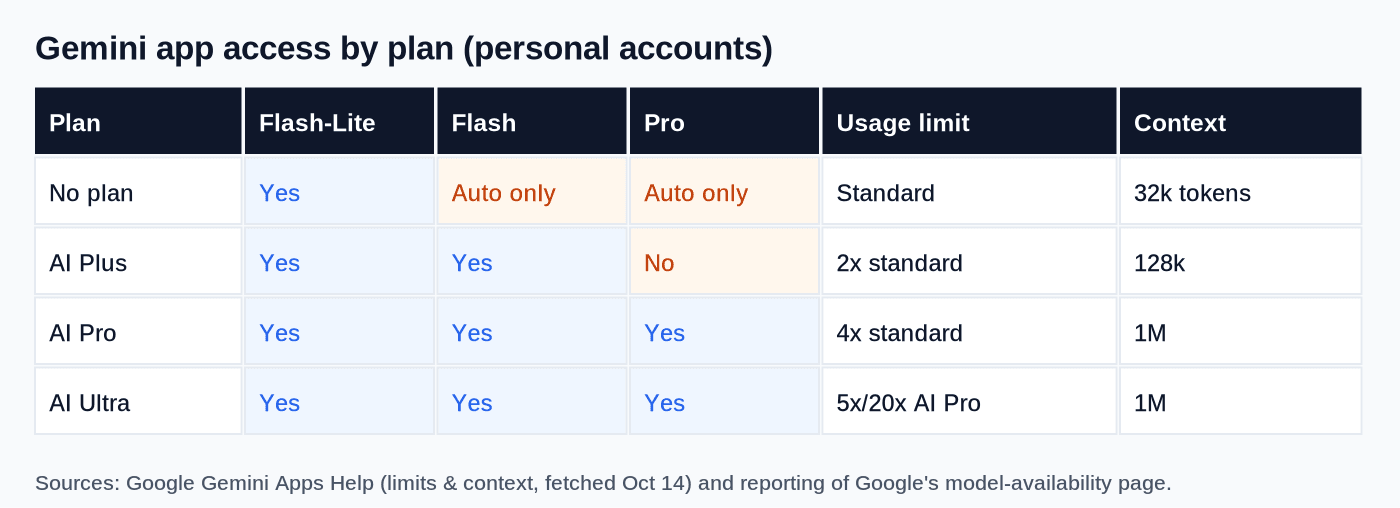
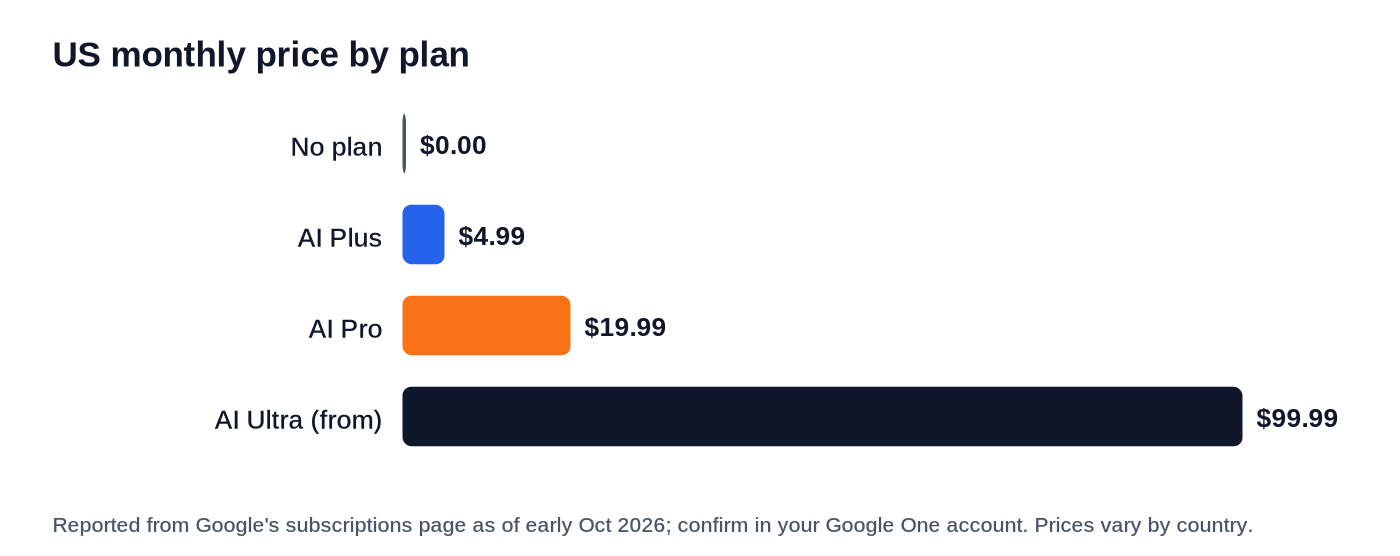
The short answer: Since October 9, 2026, free personal Gemini accounts use Flash-Lite. Google’s help page says an “Auto” setting may send some deeper prompts to Flash or Pro. Google AI Plus (reported at $4.99/month in the US) keeps Flash-Lite and Flash but loses Pro on a date Google emails to each subscriber.
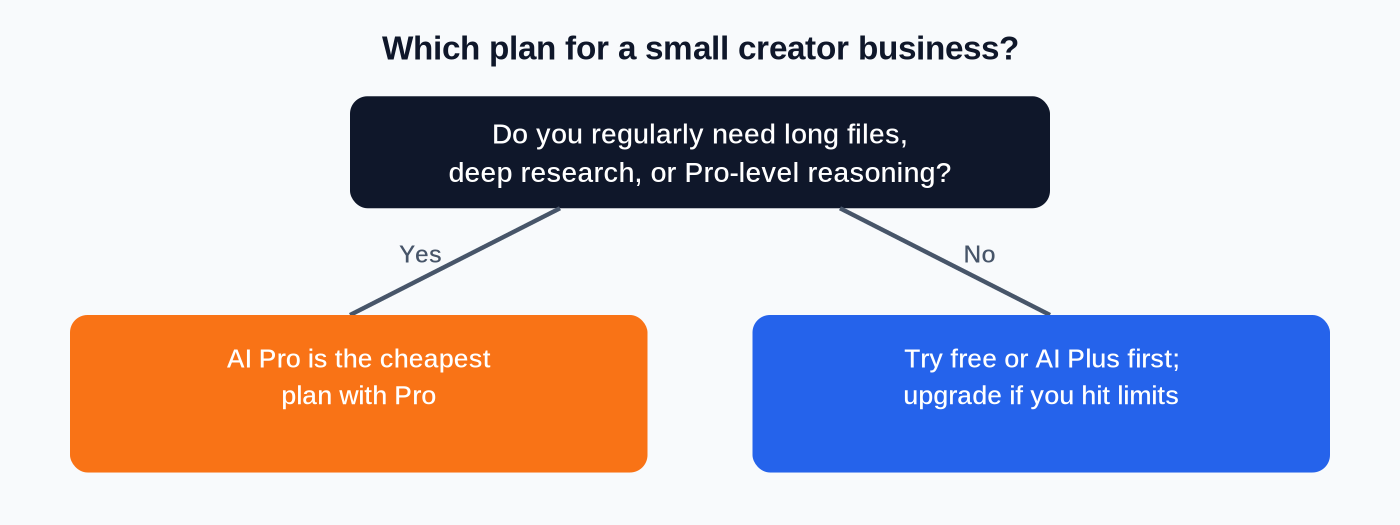
AI Pro (reported at $19.99/month) is now the cheapest plan with Gemini Pro. For most writing and brainstorming, test Free or Plus first. Pay for Pro only if long documents or deep research are a regular part of your work.
What changed, and where it’s documented
Google’s Gemini Apps Help Center has a page on model availability changes for personal accounts. Several outlets reported its contents, including 9to5Google (October 3) and TechReadly (checked October 11). According to those reports:
- Without a plan: Flash-Lite. Auto, the default, may route prompts that need deeper reasoning to Flash or Pro. If you turn off smart model selection, every response uses Flash-Lite.
- AI Plus: Flash-Lite and Flash. Pro is removed, and each subscriber gets an email with their own date.
- AI Pro and AI Ultra: Flash-Lite, Flash and Pro. Reports say AI Pro also gains Deep Think.
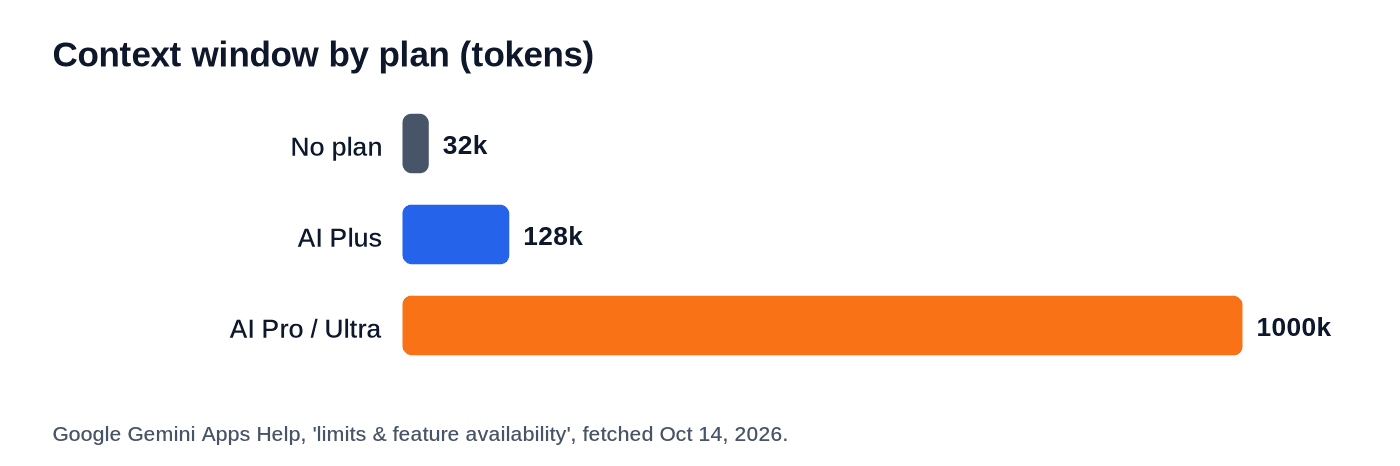
We fetched Google’s separate limits & feature availability page directly on October 14. It lists usage limits (“Standard” without a plan, “2x” for AI Plus, “4x” for AI Pro, and “5x or 20x higher than AI Pro” for Ultra) and context windows (32k tokens, 128k, and 1 million for Pro and Ultra).
When we fetched it, part of that page still showed an older model table marking every plan “Yes” for Pro. Google’s pages appear to be mid-update, so check what your own account shows.
What the numbers mean in practice
Context window
The context window is roughly how much text Gemini can hold at once: your prompt, any files you upload and the conversation so far. At 32k tokens, a long ebook draft or a stack of source PDFs won’t fit in one chat. 128k handles much more, and 1 million handles a lot. If you work with long documents, this matters more than which model name you get.
Usage limits
Google says limits are compute-based. They refresh every five hours up to a weekly cap and depend on how complex your prompt is, which features you use and how long the chat runs. Google doesn’t publish a simple “messages per day” number, and Google’s help page warns that limits “may change without notice.”
Paid plans multiply the standard allowance (2x, 4x and so on). We can’t tell you how many articles or images that works out to, because it depends on your actual workload.
Prices
| Plan | Reported US price | Models |
|---|---|---|
| No plan | $0 | Flash-Lite (Auto may route deeper) |
| Google AI Plus | $4.99/month | Flash-Lite, Flash |
| Google AI Pro | $19.99/month | Flash-Lite, Flash, Pro (+ Deep Think, reported) |
| Google AI Ultra | from $99.99/month | All, with higher limits |
These prices come from outlets citing Google’s Gemini subscriptions page as of early October. We couldn’t load that page directly, so confirm the price in your Google One account before you buy. Plans also include Google One storage and other benefits that aren’t compared here.
Which plan does a side business need?
Match the plan to the jobs you actually do:
| Your typical job | Likely enough | Why |
|---|---|---|
| Brainstorming titles, short emails, summaries | Free | Google says Flash-Lite is built for “summarization and brainstorming” |
| Regular drafting, longer chats, moderate files | AI Plus | Flash plus a 128k context window and 2x limits |
| Long PDFs, deep research, complex analysis, coding | AI Pro | Pro, a 1M-token context window and 4x limits |
- List your five most common AI tasks.
- Run them on your current plan for a week and note when you hit limits or get weak results.
- Upgrade one step only if you have a clear reason.
- Recheck after Google’s pages settle. The rollout is still going.
If you already pay for AI Plus
Watch your email for Google’s notice with the date you lose Pro. Until then, finish any Pro-dependent work, such as long research chats.
Google’s limits page says chats on paid plans can continue on Flash-Lite when you reach your limit. Whether existing Pro chats can be continued on Plus after the change isn’t documented in what we reviewed.
How usage limits work now
Google’s limits page, fetched October 14, says that if you reach your “five hour or weekly usage limits” you can upgrade or wait for the limit to refresh. Paid subscribers who reach their limit “can continue your conversation with Flash-Lite.” The same page says some features, such as media generation and Deep Research, “consume more of your usage,” and that “limits may change without notice, including due to capacity constraints.”
Worked example: a weekly content routine
Here’s a typical small-creator week mapped to plan features. These are illustrative tasks, not measured usage:
| Task | What it needs | Lowest plan that fits on paper |
|---|---|---|
| Brainstorm 20 post titles | Short prompts | Free (Flash-Lite) |
| Summarize three 20-page PDFs at once | Large context | AI Plus (128k) may fit; AI Pro (1M) has room to spare |
| Deep research on a policy change | Deep Research feature, heavy usage | Depends on plan limits; check the feature table in your account |
| Complex spreadsheet formulas or code | Strong reasoning | AI Pro (Pro model) |
Because Google bases limits on compute, the only reliable way to know is to run your own week of tasks and see where you hit a wall.
Common mistakes
- Upgrading for the model name when the context window is what you actually need.
- Assuming AI Plus still includes Pro. Check the email Google sends with your date.
- Assuming free Gemini never uses Pro. Google’s page describes Auto routing that may send deeper prompts to Flash or Pro.
- Treating a consumer plan as API access. The Gemini app plans and the Gemini API are priced separately.
- Using a personal plan for client work when your client or school provides a work account. Work and school accounts are documented separately.
Checklist before you switch plans
- List your top five AI tasks and roughly how long the documents are.
- Note which plan email Google sent you, if you’re on AI Plus.
- Run a test week on your current plan.
- Check that the price in Google One matches what you expect for your country.
- Set a reminder to review the plan again in 30 days.
FAQ
What model does free Gemini use now?
Since October 9, 2026, free personal accounts get Flash-Lite, with an Auto setting that Google says may route deeper prompts to Flash or Pro.
Does Google AI Plus include Gemini Pro?
Not after the change reaches your account. AI Plus keeps Flash-Lite and Flash, and Google emails each subscriber the date Pro is removed.
Is Google AI Pro worth it?
If you regularly need Pro-level reasoning, long documents (Pro and Ultra have a 1M-token context window) or higher limits (4x standard), it’s the cheapest plan that has them. For light use, Free or Plus may be enough.
How much is Google AI Plus in the US?
Reported at $4.99 a month as of early October 2026. Confirm in Google One, because prices vary by country.
The bottom line
This is a real downgrade for free users and for AI Plus subscribers who relied on Pro. For many small creators, though, Flash or Flash-Lite still handles the everyday work.
Pay for the context window and limits you actually use, not for the model name. For other AI plan changes this week, see the Trending Tech Brief.