Pricing Your First Ebook on KDP: 35% vs 70%, KDP Select vs Selling Direct (With a Free Calculator)
Disclosure: MakeBlogAI may earn a commission from some links on this site; this article contains no paid or affiliate links. It was researched and drafted with AI tools and checked by a person against the primary sources linked below. General information only — not legal, tax, or financial advice, and no income is promised or implied.
The short answer: On Amazon.com, an ebook priced $2.99–$12.99 can use the 70% royalty, which is 70% × (price − a delivery fee of $0.15 per MB). A 1 MB book at $4.99 earns about $3.39 per US sale, compared with $1.75 at 35%. Image-heavy books earn less on the 70% option because the delivery fee grows with file size.
KDP Select adds Kindle Unlimited but requires digital exclusivity to Amazon. Try the calculator below.
The rules, from KDP’s own pages
| Rule | Detail | Source |
|---|---|---|
| 70% price band (Amazon.com) | $2.99–$12.99, effective July 7, 2026 (was $9.99 max) | List Price Requirements |
| 35% minimum price | $0.99 under 3 MB; $1.99 for 3–10 MB; $2.99 at 10 MB+; max $200 | Same page |
| Delivery cost (70% only) | US $0.15/MB; file size rounded up to the nearest KB; minimum $0.01 | Digital Book Pricing Page |
| Print price rule | For 70%, the ebook must be at least 20% below the Amazon price of any print edition | Same page |
| Brazil, Japan, Mexico, India | 70% there requires KDP Select enrollment | Same page |
Calculator
US sale, no VAT, no price-matching. Uses KDP’s published formulas as of October 14, 2026. Your KDP dashboard is the final word.
How file size changes the math
The delivery fee is easy to overlook. A text-only novel might be under 1 MB, while a cookbook or workbook full of images can be much larger. At $4.99:
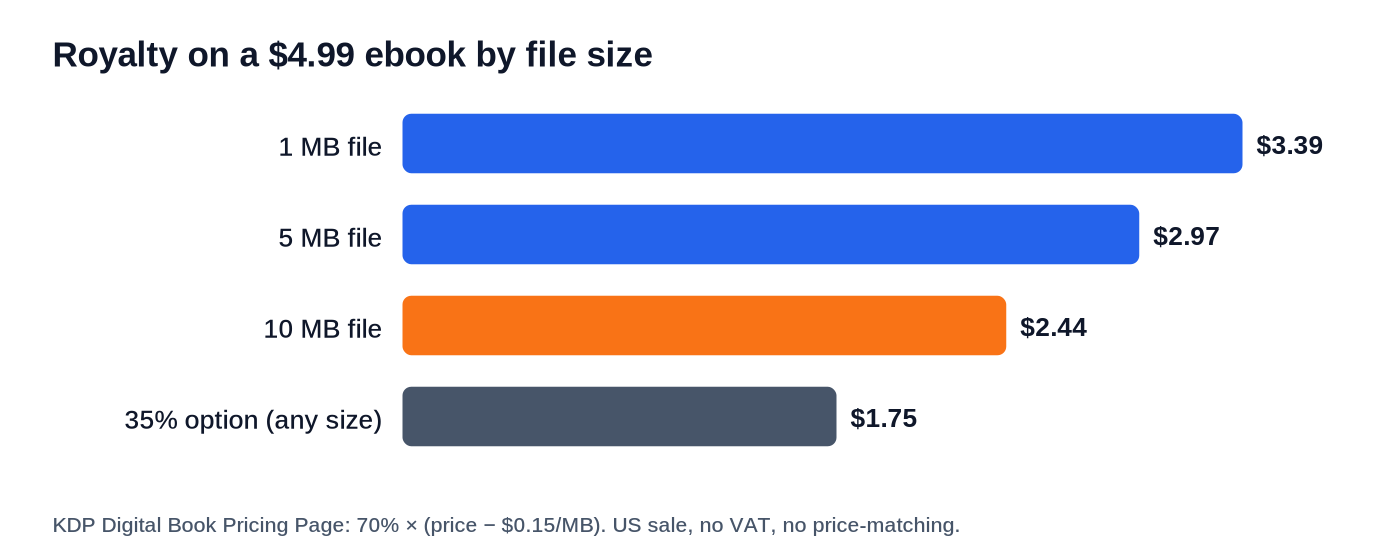
For very image-heavy books near the bottom of the band, the 35% option can sometimes earn as much or more. Run your actual file size through the calculator.
Royalties at common prices
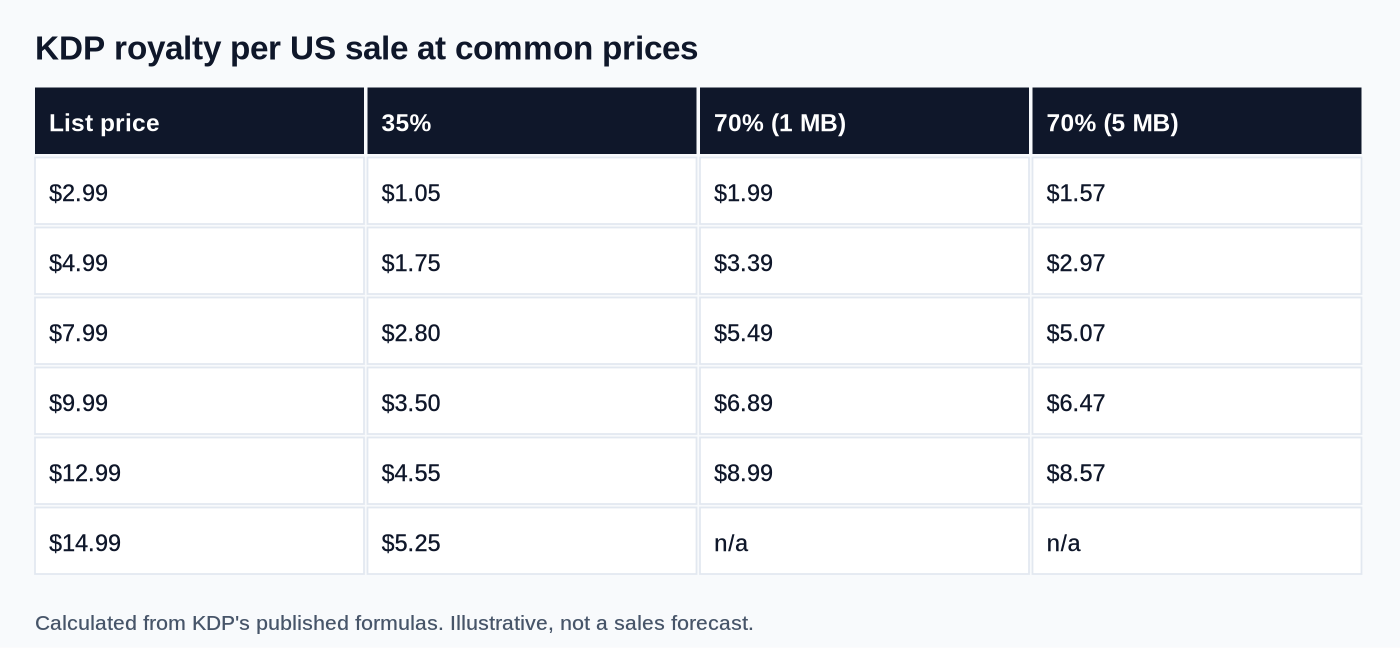
Above $12.99, the 70% option isn’t available on Amazon.com, so a $14.99 ebook earns $5.25 at 35%, less than a $9.99 ebook earns at 70% ($6.89 at 1 MB).
How to pick a price
Royalty math is only half of it. The other half is what readers in your niche expect to pay.
We don’t have data on which price sells best, and we’d be wary of anyone who claims one magic price. A sensible approach:
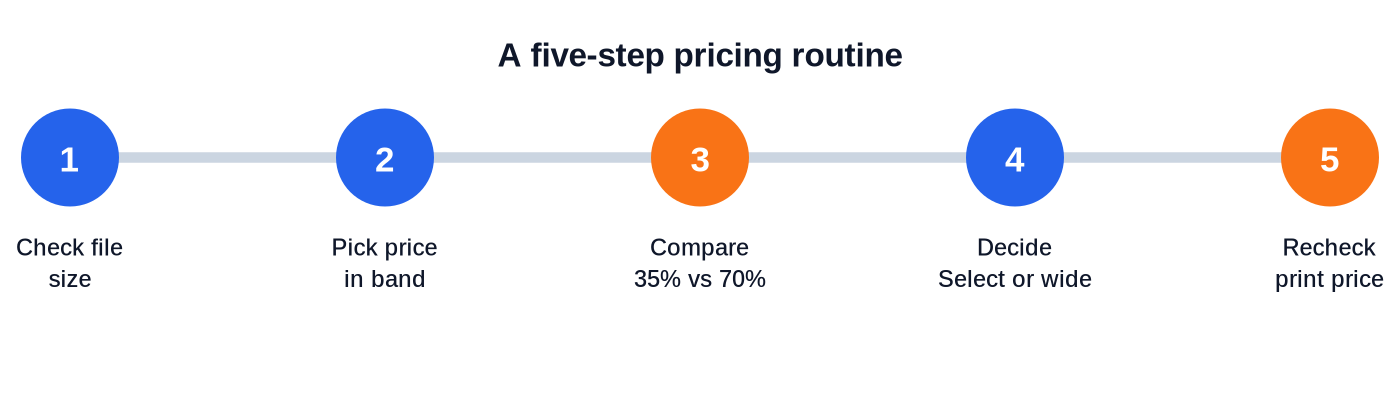
- Check your file size after formatting.
- Look at comparable books in your category and note their prices and lengths.
- Pick a price inside the 70% band unless you have a reason not to.
- Compare 35% and 70% for your file size in the calculator.
- Check the print price if you also sell a paperback. The ebook must be at least 20% lower to get the 70% option.
KDP Select or selling wide?
KDP Select is free, runs in 90-day terms, and automatically puts your ebook in Kindle Unlimited, where you’re paid for pages read (the per-page rate varies, so it isn’t modeled here). It also unlocks Free Book Promotions and Kindle Countdown Deals. The cost is exclusivity: during the term you “cannot distribute your book digitally anywhere else, including on your website” (KDP Select).
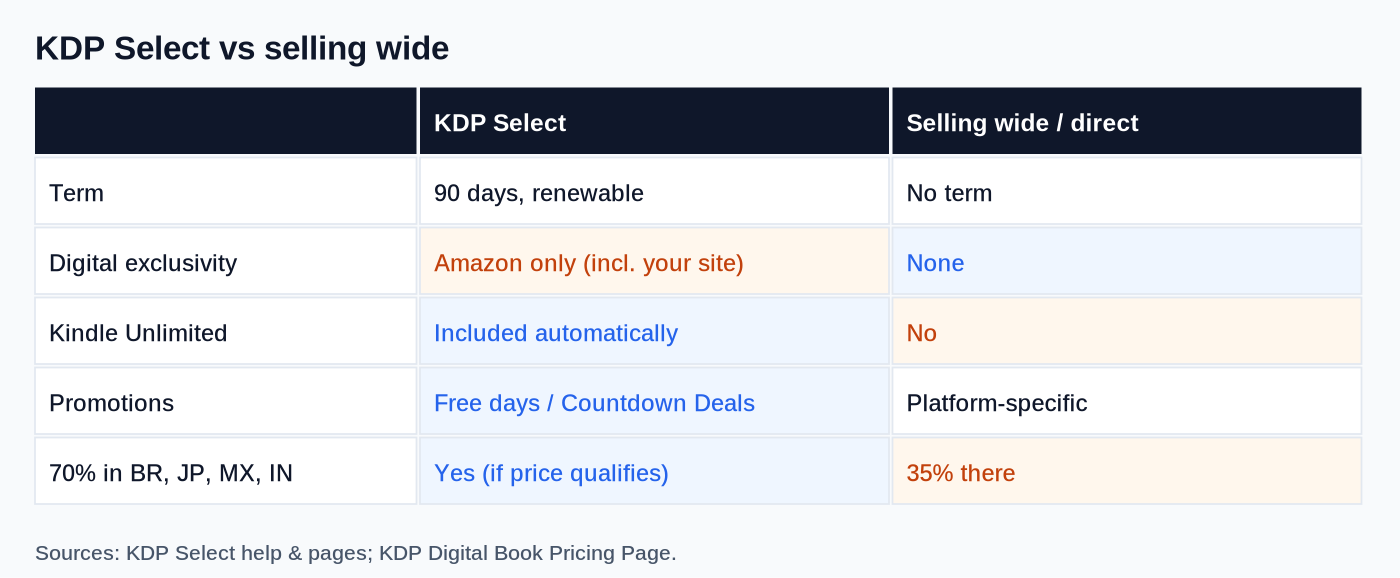
Selling wide, on Gumroad, your own site or other stores, keeps your options open. Gumroad, for example, charges 10% + $0.50 plus card processing per direct sale. See our platform fee comparison for the side-by-side numbers.
Worked example: a picture-heavy workbook
A 12 MB workbook priced at $6.99 shows how file size changes the choice:
| Option | Calculation | Royalty |
|---|---|---|
| 70% | 0.70 × (6.99 − 12 × 0.15) | $3.63 |
| 35% | 0.35 × 6.99 | $2.45 |
The 70% option still pays more here, but the gap is much smaller than for a 1 MB novel ($4.79 vs $2.45). Compressing images reduces the delivery cost. Note that a 12 MB file’s 35% minimum price is $2.99 under KDP’s file-size rules.
Where 35% and 70% break even
For a given file size, 70% × (price − delivery) equals 35% × price when price = 2 × delivery. So at $0.15/MB, the 70% option pays more as long as your price is more than 2 × 0.15 × MB, which is $0.30 per MB. A 10 MB file needs a price above $3.00.
A 20 MB file needs a price above $6.00. Any book small enough to price inside the band at a normal file size comes out ahead on 70%. Very large files near $2.99 are the exception.
Step by step: setting your price in KDP
- Upload your final manuscript and note the file size KDP reports.
- Choose 35% or 70% in the Rights & Pricing section.
- Enter a list price within the allowed range for your choice.
- If you have a paperback, check that the ebook is at least 20% cheaper than the print price (required for 70%).
- Decide on KDP Select before you publish anywhere else.
- Review your sales after a few weeks and change the price if needed. KDP lets you change it any time.
Common pricing mistakes
- Pricing at $13.99 and dropping to 35% without realizing it.
- Ignoring file size on image-heavy books.
- Forgetting the 20%-below-print rule.
- Enrolling in KDP Select while the PDF is still for sale on your own site.
- Trusting old guides that say the 70% cap is $9.99.
FAQ
How much does KDP pay per ebook sale?
On Amazon.com, 35% of the list price, or 70% of the price minus a $0.15/MB delivery fee for books priced $2.99–$12.99.
Is it better to price an ebook at $2.99 or $4.99?
On royalty alone, a 1 MB book earns $1.99 at $2.99 and $3.39 at $4.99 on the 70% option. Which sells better depends on your niche, and we don’t have data on that.
What is the KDP delivery fee?
US $0.15 per MB on the 70% option, with file size rounded up to the nearest KB and a minimum of $0.01. There’s no delivery fee on the 35% option.
Can I change my ebook price later?
Yes. KDP’s pricing information says your price can be changed at any time after publishing.
The bottom line
Price inside the $2.99–$12.99 band, check your file size, and make the KDP Select decision on purpose. Then let real sales data, not guesses, guide later price changes.
Series: Publish an AI-Assisted Ebook, the Right Way. Pillar: KDP 2026 guide · Copyright · Pricing (you are here). Related: Gumroad vs KDP vs Etsy.