


An AI blog writing workflow is a repeatable system that defines exactly how you use AI tools at each stage of creating a post — from topic research through to final editing. Without this structure, AI tools add friction instead of removing it. Building the workflow takes a few hours. Using it consistently cuts per-post writing time roughly in half.
Key Takeaways
- AI tools don’t automatically save time — your workflow does. The tool is only as efficient as the system around it.
- Most bloggers skip the setup phase entirely, then wonder why their AI output feels generic and slow.
- A few hours spent building a repeatable AI blog writing workflow compounds into many hours saved over weeks of publishing.
- The right workflow depends on your voice, your niche, and how you think — not on what any tutorial tells you is “the best” setup.
- Start with one stage of your process. Fix that. Then move to the next.
Before You Scroll
This post is the setup phase that most AI blogging tutorials skip completely. By the end, you’ll have a clear picture of what a real AI blog writing workflow looks like and exactly where to start building yours.
I spent three weeks frustrated at AI writing tools before I figured out the real problem. It wasn’t the tools. It was me — or more specifically, the fact that I had no system. I’d open a new chat, type “write me a blog post about X,” read the generic mess that came back, and spend the next two hours fixing it. Longer than just writing the thing myself.
Here’s what nobody tells you when they hand you a list of the best AI tools for bloggers: the tool is maybe 20% of the equation. The other 80% is the workflow you build around it.
The tool is maybe 20% of the equation. The other 80% is the workflow you build around it.
Why Your AI Blog Writing Workflow Matters More Than the Tool You Pick
The Tool-First Trap
Most bloggers approach AI the same way they approach a new app: download it, poke around, hope for magic. It works for consumer tools. It fails badly for AI writing, because AI output quality is almost entirely a function of what you put in and how you handle what comes out.
The problem isn’t that ChatGPT or Claude is bad. The problem is that you’re probably treating a power tool like a vending machine — insert prompt, receive post. That mental model sets you up to be disappointed every single time.
What a Workflow Actually Changes
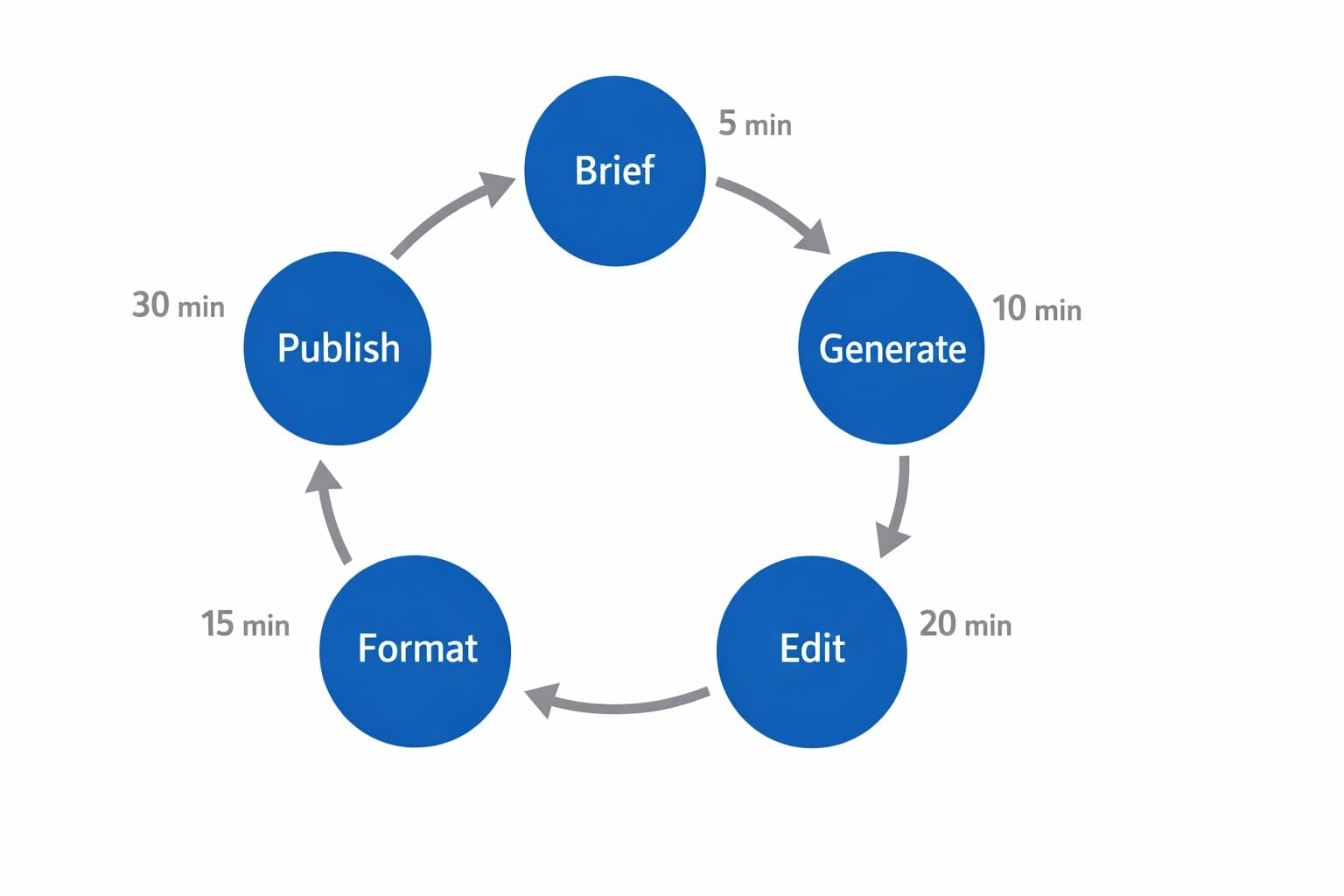
When I finally sat down and mapped out exactly what I was doing at each stage — topic selection, brief creation, draft generation, editing, formatting for WordPress — three things happened. The output got better immediately. The time per post dropped. And I stopped dreading the blank page, because there was no blank page anymore.
A structured AI blog writing workflow doesn’t just speed things up. It makes the AI’s output predictable enough to be useful. That predictability is worth more than any individual prompt trick.

If you’re still trying to figure out which tool to use before you’ve defined your process, you’re starting at the wrong end. The workflow comes first.
The Stages of an AI Blog Writing Workflow That Actually Works
Stage One: Topic and Intent Before You Open Any Tool
Before you touch AI, you should already know what the post is about, who it’s for, and what you want the reader to do or know by the end. This sounds obvious. Almost nobody does it. If you open a chat window with a vague topic and hope the AI helps you figure out the angle, you’ll get a generic post that fits anyone and resonates with no one.
Spend five minutes answering three questions: What is the primary keyword? What does someone searching that term actually want? What is my specific take on it? Write those answers down before you start prompting.
Stage Two: The Brief Is Your Secret Weapon
I don’t generate a single word of draft content without a brief. Mine is a short document — usually half a page — that specifies the angle, the reader, the tone, the sections I want covered, and anything the AI should avoid. This brief is what I paste into every prompt. It’s the reason my AI output sounds like me instead of a generic content mill.
I don’t generate a single word of draft content without a brief. The brief is why my AI output sounds like me.
Building a brief template took me about an hour. I’ve used it on every post since. That initial investment has saved me more time than any individual prompt optimization.
[INTERNAL LINK: how to write an AI blog post brief — topic: creating a reusable AI brief template for bloggers]
Stage Three: Draft Generation With Constraints
Here’s where most tutorials tell you to just “write a good prompt.” That’s not wrong, but it’s incomplete. The constraint isn’t just the prompt — it’s the model, the temperature (if you have access to it), and the length you’re asking for. Long-form drafts from a single prompt almost always need more editing than two shorter drafts stitched together. I generate in sections, not in one shot.
If a section feels off, I regenerate that section with a tighter brief — not the whole post. This is where treating AI like a collaborative tool rather than a one-shot machine pays off.
The Edit Phase: Where Your AI Blog Writing Workflow Pays Off
AI Output Is a First Draft, Not a Final Draft
I want to be direct about this: I have never published an AI-generated post without editing it. Not once. The edit phase isn’t optional, and anyone telling you to “just review it” is underselling how much work good editing takes. The difference is that editing a structured AI draft takes me about 30 minutes. Writing from scratch used to take two to three hours.
I have never published an AI-generated post without editing it. The edit phase isn’t optional — but it’s still faster than writing from scratch.
What to Look for in the Edit Pass
I check for four things in order: accuracy (any facts I can’t verify get cut or rewritten), voice (anything that sounds corporate or overly formal gets reworded), structure (does the flow actually serve the reader, or did the AI just generate sections in default order?), and SEO basics (primary keyword placement, header structure, internal links).
After a few months of doing this, I have a mental template for each of these checks. What was once a two-hour slog is now a 30-minute focused pass. That’s the compounding effect of a consistent workflow — it gets faster the more you use it.
The Counterargument: “I Just Want to Write, Not Build Systems”
The Case for Keeping It Loose
I get this. Genuinely. If you’re a natural writer who finds rigid process suffocating, the idea of building a workflow feels like bureaucracy for your brain. Some bloggers do thrive on improvisation — they open a doc, start writing, use AI as a real-time thought partner, and produce work they’re proud of. That’s legitimate.
There’s also a reasonable argument that too much process kills creative momentum. Spending an hour on a brief for a 600-word post is overkill. Not every piece of content needs the full workflow treatment.
Why the System Still Wins for Most Bloggers
Here’s my honest take: the “I’ll figure it out as I go” approach works fine when you’re writing one post a month. The moment you’re trying to publish consistently — say, two to four posts a week — improvisation becomes a bottleneck, not a feature. Systems aren’t about limiting creativity. They’re about making creativity sustainable.
If you find that a full workflow feels heavy for your style, strip it back. A brief that’s three sentences instead of half a page still beats no brief at all.
Systems aren’t about limiting creativity. They’re about making creativity sustainable.
Token Efficiency: The Part Nobody Talks About
Why Token Costs Matter for Bloggers
If you’re using AI APIs rather than a flat-rate tool, your workflow design directly affects your costs. Long, unfocused prompts that generate long, unfocused outputs waste tokens on content you’ll cut anyway. A tighter brief produces tighter output. That’s not just better quality — it’s cheaper.
Even on flat-rate tools, token efficiency matters because it affects output quality. Models work better with focused, specific prompts than with everything-and-the-kitchen-sink requests.
[INTERNAL LINK: understanding token utilization for bloggers — topic: how token usage affects AI writing costs and quality]
Practical Token Habits
A few things I’ve built into my workflow: I never include the full article brief in every message of a multi-turn conversation — I include it once, then refer back to it. I generate in sections rather than asking for an 1,800-word post in one shot. And I keep a separate file of reusable prompt fragments — opening structures, transition phrases, FAQ prompt templates — so I’m not reinventing them each time.
None of this is exotic. It’s just thoughtful use of the tool you’re already paying for.

Building Your AI Blog Writing Workflow: Start Here
Don’t Try to Overhaul Everything at Once
This is the mistake I made first. I tried to design the perfect end-to-end system before I’d even identified what was actually slowing me down. I wasted a weekend on it.
A better approach: pick the one stage of your current process that feels the most painful. Maybe it’s the blank-page start. Maybe it’s the editing slog. Maybe it’s formatting for WordPress. Fix that one stage first. Use it for two weeks. Then move to the next.
Pick the one stage that feels the most painful. Fix that first. Use it for two weeks. Then move to the next.
A Starting Point If You Don’t Know Where to Begin
If you have absolutely no workflow right now and you want somewhere concrete to start: begin with the brief. Before your next post, write down the primary keyword, the reader’s main question, your specific angle, and two or three things the AI should not do (don’t be listy, don’t use formal corporate language, don’t start with a definition). Paste that into your first prompt. See what happens.
That’s it. That’s version one of your workflow. It takes five minutes to set up. In my experience, it immediately improves output quality — not by a little. By a lot.
[INTERNAL LINK: AI blog post prompts that work — topic: prompt templates for bloggers at different stages of the workflow]
What This Looks Like in Practice: A Real Example
One Post, Measured
Here’s what my current workflow looks like for a standard 1,200-word post. I spend about five minutes on the brief. Ten minutes generating and reviewing two draft sections. Twenty-five minutes editing and rewriting for voice. Ten minutes formatting in WordPress and adding internal links. Total: roughly 50 minutes per post.
Before I had a workflow, the same post took two and a half hours, minimum. That difference — for me, at my current publishing pace — compounds to many hours saved over several weeks. It’s not a marginal improvement. It changes what’s possible.
That difference compounds to many hours saved across a month of publishing. It changes what’s possible.
Your Numbers Will Be Different
I’m not going to tell you my workflow is the best one. It works for me because I approach tools the way I was trained to approach IT systems — what works under real conditions, not what the product page claims. My pace, my niche, and my voice shaped the system I built. Yours will look different, and that’s correct. What I can tell you is why the structure matters, not which exact structure to copy.

Frequently Asked Questions
What is an AI blog writing workflow?
An AI blog writing workflow is a repeatable, stage-by-stage process for using AI tools to research, draft, edit, and publish blog posts. It defines what you do before, during, and after using AI — so the tool produces consistent, usable output instead of generic text that requires hours of reworking.
How long does it take to build an AI workflow for blogging?
A basic workflow — brief template, a few core prompts, an edit checklist — can be built in two to three hours. A more refined system with reusable prompt fragments and stage-specific instructions takes a weekend. The payoff starts immediately on your first post and compounds over every post after that.
Do I need to use multiple AI tools in my workflow?
No. Many bloggers run an effective workflow with a single tool. What matters is that you have a defined process around the tool, not the number of tools. Adding more tools before you’ve built a solid workflow usually adds complexity, not speed. Start with one, get good at it, and add only when there’s a clear gap.
Why does my AI writing still sound generic even with good prompts?
Usually because the brief isn’t specific enough about voice, angle, or what to avoid. Generic output is almost always a brief problem, not a tool problem. Try adding three explicit “do not” instructions to your next prompt — no formal language, no listicles, no opening with a definition — and compare the output.
Is an AI blog writing workflow worth it for short posts?
For posts under 600 words, a full workflow is overkill. A three-sentence brief and a single focused prompt is enough. The full stage-by-stage system pays off most on standard and long-form posts where the editing overhead without structure gets expensive.
Where to Go From Here
If this post landed for you, the next step is to actually open a doc and write your first brief. The other posts in this category walk through each stage of the workflow in more detail — start with whichever stage is currently costing you the most time.
Browse more posts in the AI Tools and Workflow category to keep building your system — one stage at a time.